How we tamed async state chaos with StatefulRenderer
A deep dive into how a single React component standardised async UI patterns across our entire application.
 Halil KayimTechnical Lead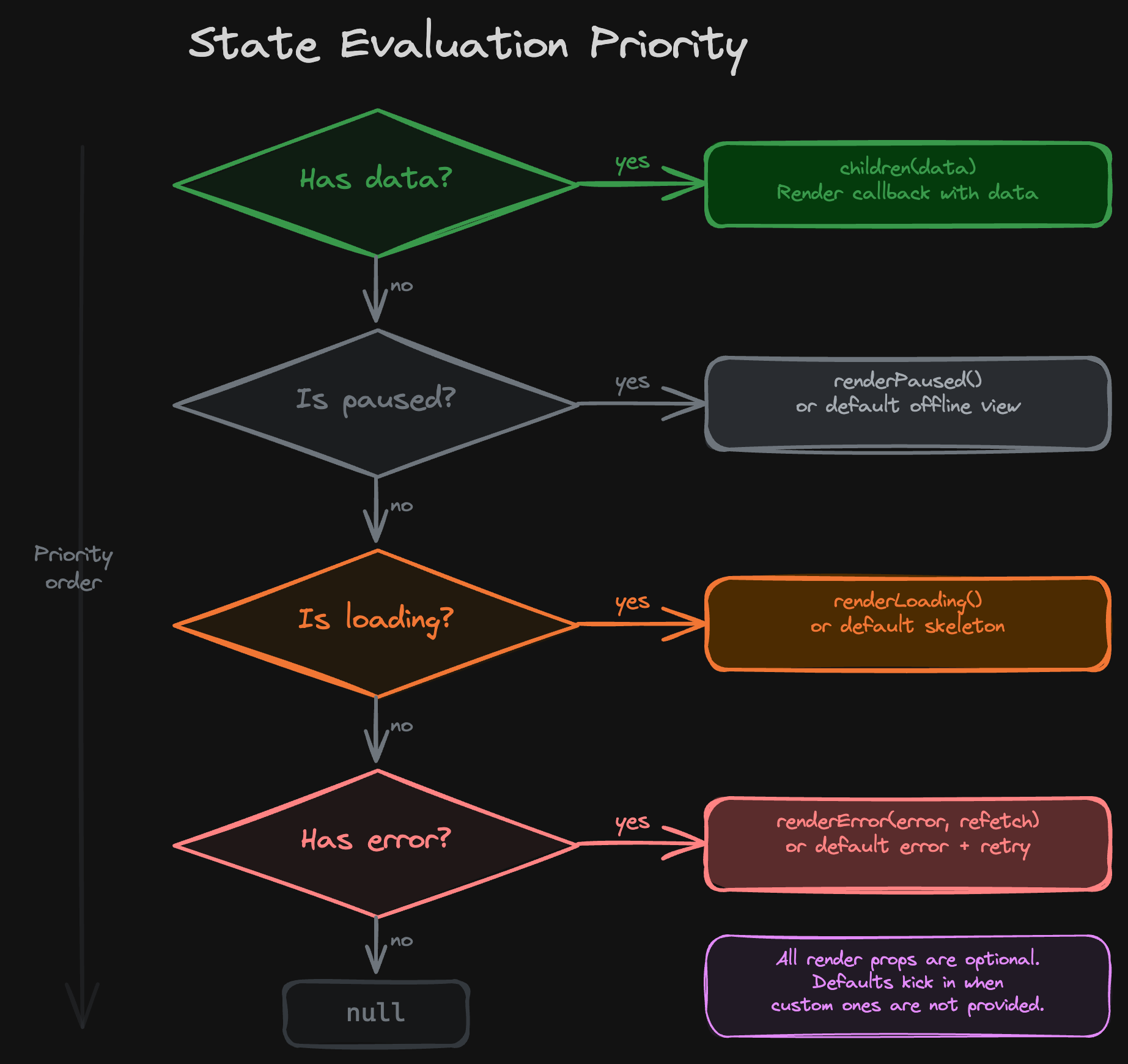
The problem: a thousand ways to load
Every React developer has written this code:
function UserProfile() {
  const { data, isLoading, error } = useGetUser();

  if (isLoading) return <Spinner />;
  if (error) return <p>Something went wrong</p>;
  if (!data) return null;

  return <ProfileCard user={data} />;
}
It looks harmless enough. But multiply it across dozens of components and a growing team, and patterns begin to diverge. Some developers check isLoading first. Others check error first. Some forget to handle the case where data is undefined after loading. Almost nobody handles the offline/paused state. And when a runtime error occurs inside the success render path? The whole page crashes.
We audited our PWA codebase and found a sobering picture:
- No consistent evaluation order — different components checked states in different sequences, leading to subtle UI bugs (e.g. showing an error screen while data was still loading on a slow connection).
- Missing states — the majority of components had no handling for the network-paused (offline) or even the error state.
- No runtime safety net — if a rendering error occurred after data was successfully fetched, the component would crash with no recovery path.
- Boilerplate everywhere — every async component repeated the same 10-15 lines of conditional logic.
We needed a single, opinionated pattern that the entire team could use. Something that handled the edge cases developers forget about, while being simple enough to adopt without friction.
The four states of async data
Before designing the solution, we needed to agree on what states actually exist when fetching data asynchronously. We settled on four:
Critically, the order matters. We evaluate states in a strict priority:
- Data — if we have data, show it, even if there is a background refetch happening.
- Paused — if the network is down and we have no data, tell the user immediately.
- Loading — if the network is fine but data hasn't arrived yet, show a skeleton.
- Error — if the fetch completed and failed, show the error.
- Null — if none of the above apply (rare edge case), render nothing.
This ordering is deliberate. Data always wins because showing stale data with a background refresh is better than flashing a loading skeleton. Paused takes priority over loading because "you're offline" is a more actionable message than a spinner that will never resolve.
The solution: StatefulRenderer
StatefulRenderer is a single React component that encapsulates all of this logic. At its simplest:
function MyRequestsPage() {
  const fundsQuery = useFundsRequests({ accountId, personId });

  return (
    <StatefulRenderer state={fundsQuery}>
      {(items) => <RequestsList items={items.rows} />}
    </StatefulRenderer>
  );
}
That's it. Pass a React Query result (or any object with data, isLoading, error, and optionally isPaused and refetch) as the state prop. Provide a render callback as children. StatefulRenderer handles everything else:
- Shows a skeleton while loading
- Shows a connection error when offline
- Shows an error with a retry button on failure
- Wraps the success render in an error boundary for runtime safety
- Logs errors once (not on every re-render) to avoid spamming
The before/after speaks for itself:
Before (15+ lines of ad-hoc logic):
function MyRequestsPage() {
  const { data, isLoading, error, refetch } = useFundsRequests({
    accountId,
    personId,
  });

  if (isLoading) {
    return (
      <Flex flex={1} justifyContent="center" alignItems="center">
        <Spinner />
      </Flex>
    );
  }

  if (error) {
    return <ErrorState type="internal-error" onTryAgain={refetch} />;
  }

  if (!data) return null;

  return <RequestsList items={data.rows} />;
}
After (5 lines with StatefulRenderer):
function MyRequestsPage() {
  const fundsQuery = useFundsRequests({ accountId, personId });

  return (
    <StatefulRenderer state={fundsQuery}>
      {(items) => <RequestsList items={items.rows} />}
    </StatefulRenderer>
  );
}
The "after" version also handles offline state and runtime errors — things the "before" version silently ignored.
Two rendering modes
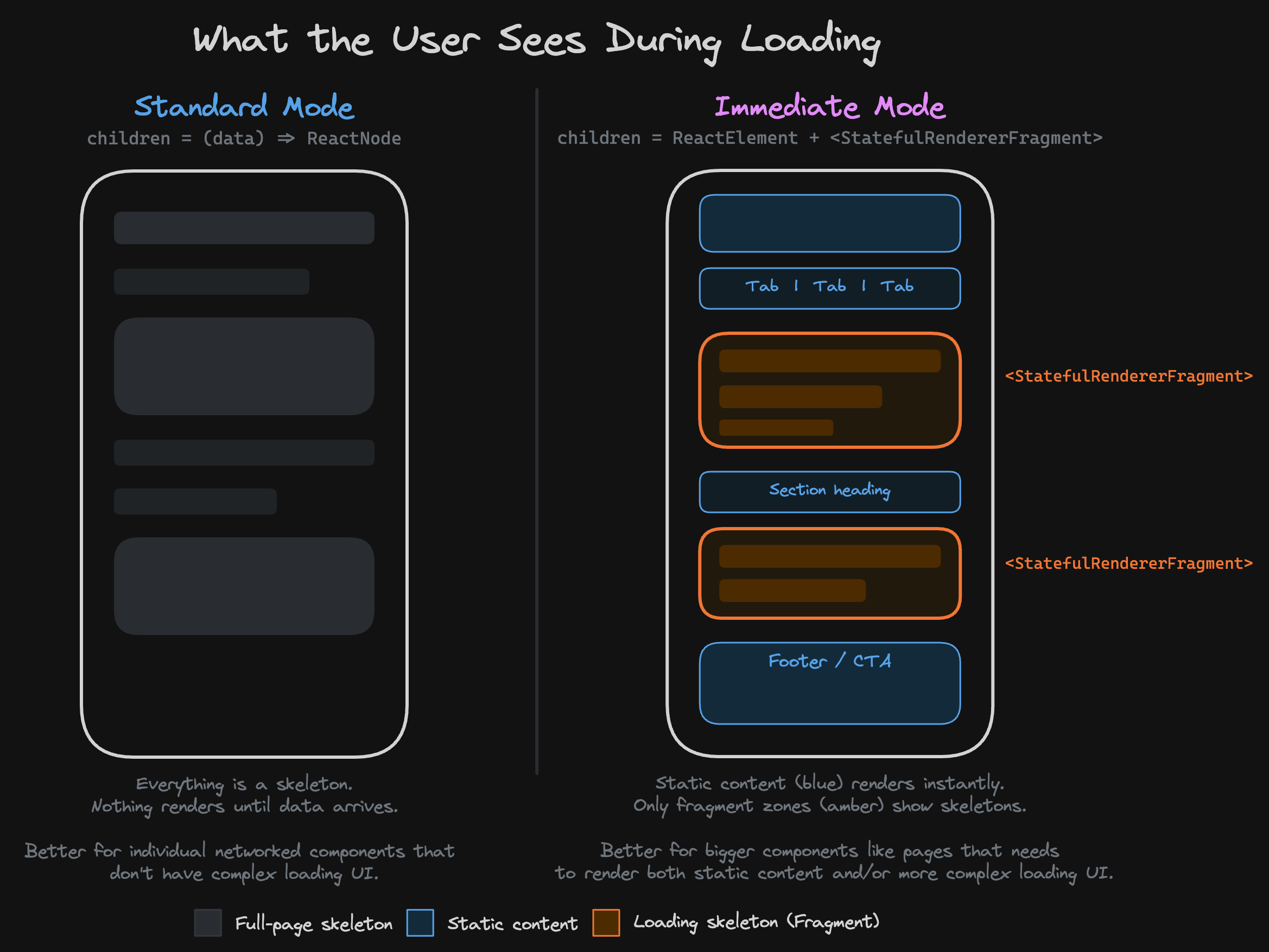
Not every UI fits neatly into "show loading OR show data". Sometimes you have a page with a static header, a dynamic data section, and a static footer. You don't want the header and footer to disappear while the data loads.
StatefulRenderer solves this with two rendering modes, detected automatically based on the type of children you pass.
Standard mode (function children)
Pass a render callback. StatefulRenderer controls the entire render output.
<StatefulRenderer state={query}>
  {(data) => <DataView data={data} />}
</StatefulRenderer>
Best for: simple pages where the entire content depends on the fetched data.
Immediate mode (element children + fragments)
Pass JSX elements directly. StatefulRenderer renders them immediately, and you use StatefulRendererFragment to mark the parts that depend on data.
<StatefulRenderer state={batchPaymentQuery}>
  <Stack spacing={24}>
    <header>
      <h1>Batch Payment</h1>
    </header>

    {/* Only this part shows a skeleton while loading */}
    <StatefulRendererFragment renderLoading={() => <TitleSkeleton />}>
      {({ name }) => <Text type="heading.medium">{name}</Text>}
    </StatefulRendererFragment>

    {/* This also gets its own skeleton */}
    <StatefulRendererFragment renderLoading={() => <StatusSkeleton />}>
      {({ status }) => <StatusBadge status={status} />}
    </StatefulRendererFragment>

    <footer>
      <p>Static content always visible</p>
    </footer>
  </Stack>
</StatefulRenderer>
The static header and footer render instantly. Each StatefulRendererFragment independently shows its own skeleton, then resolves to data when it arrives. The result is a much smoother perceived loading experience.
This works because StatefulRenderer shares its state through React Context, and each Fragment consumes that context independently.
The error boundary nobody asked for (but everyone needed)
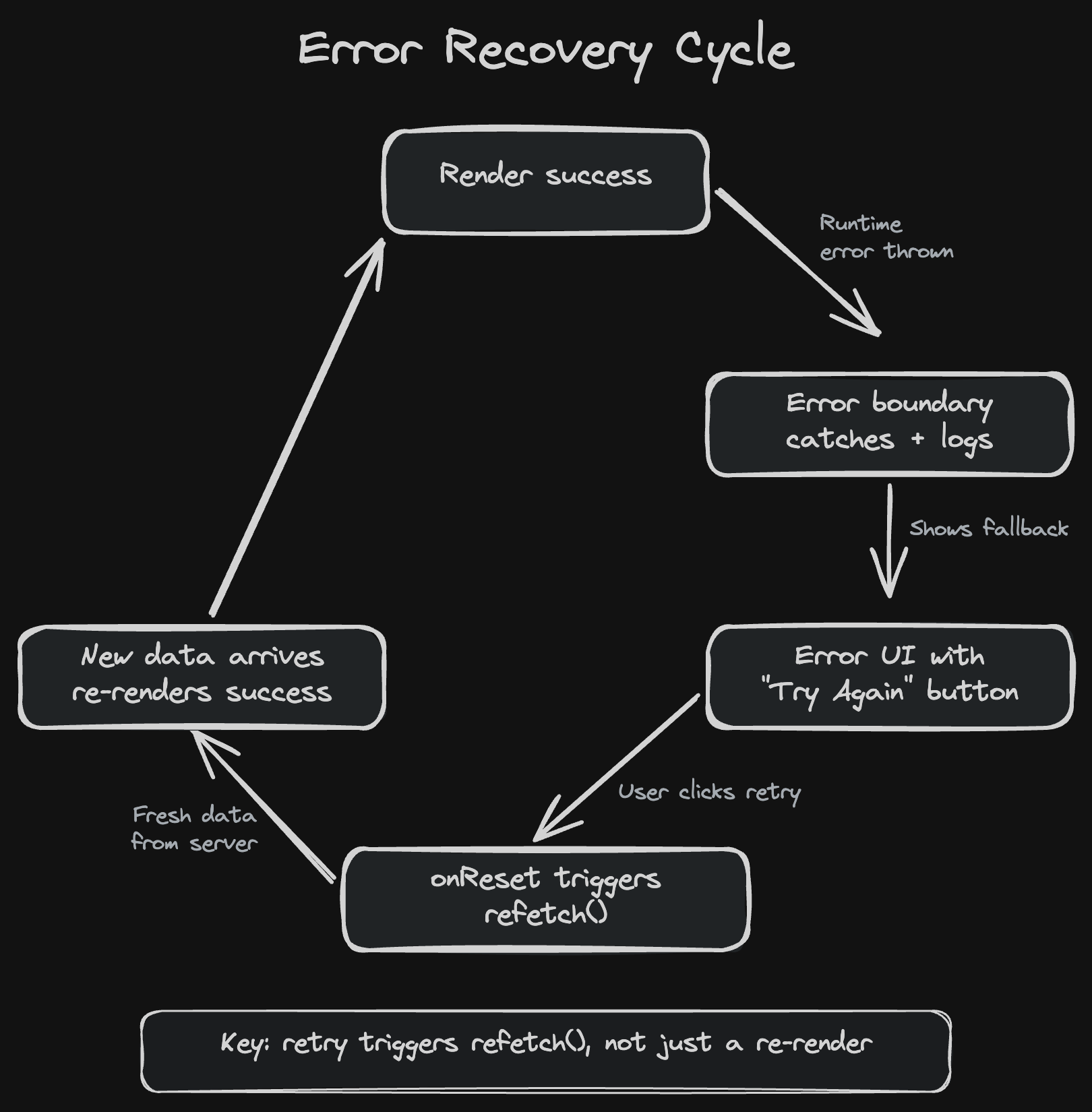
One of StatefulRenderer's most valuable features is something most developers never think about: what happens when the success render path throws?
Consider this scenario: the API returns data successfully, but the data has an unexpected shape — maybe a field is null that you expected to always be present. Your render callback accesses data.user.name and gets a Cannot read properties of null error.
Without StatefulRenderer, this crashes the entire page (or the nearest error boundary, if you remembered to add one). With StatefulRenderer, the built-in error boundary catches the error, logs it, and shows the same error view with a retry button. The developer does not need to think about this — it happens automatically for every component that uses StatefulRenderer.
The key insight is in how retry works. When the user clicks "Try Again" on a runtime error, StatefulRenderer does not just re-render with the same broken data. It triggers a full refetch from the server. If the issue was a transient data anomaly, the retry will likely succeed. If it was a genuine bug, the error is logged with full context for debugging, and the user sees a recoverable error screen instead of a white page.
Beyond React Query: custom state objects
While StatefulRenderer was designed primarily for React Query's UseQueryResult, real applications often need to combine data from multiple sources. StatefulRenderer accepts any object that matches its state interface:
interface StatefulRendererCustomState<DataType, ErrorType> {
  data: DataType | undefined;
  error: ErrorType | null;
  isLoading: boolean;
  isPaused?: boolean;
  refetch?: () => void;
}
Here is an example where a component needs data from two independent API calls before it can render:
function TeamOverviewCard({ teamId }) {
  const membersQuery = useGetTeamMembers({ teamId });
  const statsQuery = useGetTeamStats({ teamId });

  const state = useMemo(
    () => ({
      data:
        membersQuery.data && statsQuery.data
          ? { members: membersQuery.data, stats: statsQuery.data }
          : undefined,
      isLoading: membersQuery.isLoading || statsQuery.isLoading,
      error: membersQuery.error ?? statsQuery.error,
      isPaused: membersQuery.isPaused || statsQuery.isPaused,
      refetch: () => {
        membersQuery.refetch();
        statsQuery.refetch();
      },
    }),
    [membersQuery, statsQuery]
  );

  return (
    <StatefulRenderer state={state}>
      {({ members, stats }) => (
        <Card>
          <MembersList members={members} />
          <StatsChart stats={stats} />
        </Card>
      )}
    </StatefulRenderer>
  );
}
Both queries run in parallel. The custom state object waits for both to resolve, merges their loading/error/paused states, and combines their refetch functions. StatefulRenderer then handles the rest — same consistent skeleton, error, and offline behaviour as a single-query component.
Adoption: a work in progress
Building the component was the easy part. Getting a large team to consistently use it is an ongoing effort.
Our adoption strategy has three phases:
- Phase 1: Introduction (complete). We built StatefulRenderer, wrote a comprehensive spec file, and presented it to the team. Early adopters started using StatefulRenderer in new features.
- Phase 2: Migration (in progress). We are gradually migrating existing components. Each migration is small — typically replacing 10-15 lines of ad-hoc conditional logic with 3-5 lines of StatefulRenderer usage. We tackle these as part of normal feature work, not as a separate "migration project". Currently, ~30 components use StatefulRenderer, while many more still use ad-hoc patterns — particularly form-heavy pages, settings screens, and components with complex multi-query orchestration.
- Phase 3: Enforcement (active for new code). We have added a project rule:
Use StatefulRenderer from apps/pwa/src/components/StatefulRenderer. Never custom loading/error patterns.
This rule is enforced in code reviews and, increasingly, by AI. We have committed to AI-assisted development with Claude, with a goal of at least 75% AI-generated code in the very near future. This makes enforcement almost automatic — when Claude implements a new feature that fetches data, it reads the StatefulRenderer spec file, understands the required pattern, and uses it correctly without being told. The spec file acts as a contract: it describes the component's API, its rendering modes, the state evaluation order, and when to use each mode. The result is that new code arrives in pull requests already using the right pattern, and human reviewers can focus on business logic rather than policing async state boilerplate. Existing components are migrated opportunistically when they are touched for other reasons.
The honest picture: adoption is not universal yet, and that is by design. We prioritised getting the pattern right and enforcing it for new code over a big-bang migration. Legacy components will catch up naturally over time.
The type safety story
StatefulRenderer uses TypeScript generics to maintain full type safety through the render path — but you never need to write them out. The types are inferred from the state prop:
// useGetProduct returns UseQueryResult<Product, ProductError>
const productQuery = useGetProduct({ productId });

<StatefulRenderer
  state={productQuery}
  renderError={(error, retry) => (
    // error is inferred as ProductError
    <ErrorCard errorCode={error.code} onRetry={retry} />
  )}
>
  {(product) => (
    // product is inferred as NonNullable<Product>
    <h1>{product.name}</h1>
  )}
</StatefulRenderer>
The NonNullable wrapper on the render callback is a small but important detail. By the time your callback is invoked, StatefulRenderer has already confirmed that data is truthy. The type system reflects this guarantee, so you never need to null-check inside the callback. And because the generics are inferred from the query hook, the types flow through automatically — no manual annotation required.
The same type safety extends to StatefulRendererFragment in immediate mode, which consumes types from the parent context.
The elephant in the room: React Suspense
If you have been following React's trajectory, you are probably thinking: "Why not just use Suspense?"
It is a fair question. React Suspense promises exactly what StatefulRenderer delivers — declarative async state handling where you define what to show while waiting, and React handles the orchestration. With React 18+ (we recently upgraded to React 19), Suspense for data fetching is stable. So why build a custom component?
The answer comes down to our data fetching layer.
We are on React Query v4
This was the single biggest factor in our decision. Our codebase uses TanStack Query (React Query) v4.7.1. Suspense-native data fetching via useSuspenseQuery was not introduced until TanStack Query v5. In v4, there was an experimental suspense: true option, but it was never promoted to stable and had known edge cases around error handling and concurrent rendering.
On top of that, v5 introduced a significant number of breaking changes — renamed hooks, removed options, new defaults, changed return types. For a codebase at our scale, that migration is not something you do on a whim. It requires careful planning, incremental rollout, and thorough testing across hundreds of components. We were not going to block a core UI pattern on an experimental API and a major library migration.
What Suspense looks like under the hood
Suspense works differently from StatefulRenderer. The data-fetching component throws a promise while loading, and React catches it at the nearest boundary. Errors are caught by a separate . Here is the raw version:
function MyRequestsPage() {
  // useSuspenseQuery throws a promise while loading
  // and throws the error if the query fails
  const { data } = useSuspenseQuery(fundsRequestsOptions);

  return <RequestsList items={data.rows} />;
}

// Parent wraps with Suspense + ErrorBoundary
function MyRequestsPageWrapper() {
  return (
    <ErrorBoundary fallback={<ErrorState />}>
      <Suspense fallback={<Skeleton />}>
        <MyRequestsPage />
      </Suspense>
    </ErrorBoundary>
  );
}
But nobody would ship this pattern across hundreds of components without an abstraction. You would still want sensible defaults for loading and error states, co-located state handling, offline awareness, and a Fragment pattern for complex layouts. In other words, you would still end up building something like StatefulRenderer — just powered by Suspense under the hood instead of checking query state directly.
What the abstraction would still need to solve
Even with Suspense as the underlying mechanism, the abstraction layer would need to handle the same gaps that StatefulRenderer already fills.
- Offline/paused state is not a Suspense concept. Suspense has two states: loading and done. There is no native concept of "the network is paused". Any abstraction on top would still need to detect network status and present a dedicated offline view — exactly what StatefulRenderer's
renderPausedalready does. - Error handling needs co-location, not scattering. In raw Suspense, errors are handled by a separate ErrorBoundary that may live far from the Suspense boundary in the component tree. An abstraction would need to bring these back together so that loading, error, paused, and success states are defined in one place — exactly what StatefulRenderer already does.
- The Fragment pattern needs shared context. StatefulRenderer's immediate mode, where static content renders instantly and StatefulRendererFragments handle individual data-dependent sections, does not map cleanly to Suspense boundaries. You would need nested Suspense boundaries for each section, and they would all need to share the same data source. An abstraction would need context-based state sharing to coordinate this — exactly what StatefulRenderer already does.
- Retry needs to wire to refetch, not just re-mount. Resetting a Suspense ErrorBoundary re-mounts the component tree, which triggers a new render and a new query — but the semantics around cache invalidation and retry are less explicit. An abstraction would need to wire retry directly to the query's refetch function — exactly what StatefulRenderer already does.
The upgrade path
StatefulRenderer is not a permanent alternative to Suspense. It is a bridge. When we complete our React Query v5 upgrade, the plan is to evolve StatefulRenderer's internals to use useSuspenseQuery while keeping the same external API. Developers would not need to change a line of code, but we would gain React's concurrent rendering benefits under the hood.
This requires updating our API client layer to use useSuspenseQuery instead of useQuery — a non-trivial migration in itself, since every generated query hook would need to change. But because StatefulRenderer already provides the abstraction boundary, the consumer components are shielded from that change entirely. That is the payoff of having a single, consistent abstraction: when the underlying mechanism evolves, the rest of the codebase does not need to know.
Known limitations
StatefulRenderer solves the common case well, but it has real limitations we are aware of and working around.
Multi-query boilerplate
As we showed earlier, the custom state object pattern handles multiple queries well — you compose them into a single state and StatefulRenderer takes it from there. But the merging logic (isLoading: a.isLoading || b.isLoading, error: a.error ?? b.error, etc.) is repetitive. Every multi-query component writes the same boilerplate.
A useCombinedState(...queries) hook that automates this merging would eliminate the repetition while preserving the pattern.
Limited state exposure in render props
StatefulRenderer's render callbacks only receive the data itself. They have no access to the broader query state — things like isFetching (background refetch while showing stale data), isPlaceholderData, or fetchStatus. This means there is no built-in way to show an "updating..." indicator or dim stale content during a background refetch.
The fix is straightforward: expose the full state object to all render props, so each callback can access whatever it needs beyond just the data. A render callback that receives (data, state) instead of just (data) would let developers handle these cases without stepping outside StatefulRenderer.
No pagination support
Infinite queries with isFetchingNextPage and hasNextPage are a completely separate pattern. StatefulRenderer does not attempt to handle them. Components using useInfiniteQuery manage their own loading-more states manually.
This is arguably the right call — pagination is a different enough UX pattern that forcing it into StatefulRenderer would make the API confusing. But it means StatefulRenderer's reach stops at the first page of data.
What is next
The limitations we described are real, but none of them are fundamental. A useCombinedState hook would eliminate the multi-query boilerplate. Exposing the full state object to render callbacks would unlock background refetch indicators and other advanced patterns. These are small, additive changes that do not require rethinking the architecture.
The bigger evolution is already underway. We already have work underway upgrading from React Query v4 to v5. Once that lands, useSuspenseQuery becomes available, and with it the option to use Suspense under the hood while keeping StatefulRenderer's external API unchanged. Developers would not need to change a line of code, but we would gain React's concurrent rendering benefits for free.
Looking further ahead, the question is whether StatefulRenderer should evolve into a thin Suspense wrapper or whether we should gradually migrate simple cases to native Suspense boundaries and keep StatefulRenderer for the complex scenarios it handles best — immediate mode, offline state, multi-query composition. We do not need to decide that today.
The goal is not to keep StatefulRenderer forever. It is to keep the principle forever: async state handling should be standardised, opinionated, and consistent. Whether that is delivered by StatefulRenderer, Suspense, or something else entirely is an implementation detail.
Results (so far)
State evaluation order is guaranteed. No more subtle bugs from checking error before isLoading or forgetting to handle isPaused. The priority is encoded once in StatefulRenderer and applied everywhere. This has had a knock-on effect beyond code — developers now think about all four states when building new features, and that mindset has spread to designers too. Designs now arrive with loading, error, and offline states considered upfront, rather than being patched in after the fact.
Every new async component handles offline state and runtime errors. Before StatefulRenderer, these were afterthoughts that most developers skipped. Now they are built in by default — you get them without writing a single extra line.
New code is enforced via project rules and AI. Ad-hoc async state patterns in new components are flagged in code review. With Claude generating an increasing share of our code using the spec file, the right pattern is used from the start.
Boilerplate is significantly reduced. A typical async component went from 15+ lines of conditional rendering logic to around 5. That is less code to write, less to review, and less to maintain.
But the result we are most proud of is the one we cannot easily measure: the number of bugs that didn't happen because a developer used StatefulRenderer instead of writing their own loading/error handling from scratch.
Try it yourself
The pattern is not specific to our stack. If you are using React with any async data fetching library, you can build your own StatefulRenderer in under 100 lines — or send Claude (or your favourite AI assistant) the link to this post and have it build one for your codebase in minutes. The key ingredients:
- A strict state evaluation order — decide once and enforce everywhere.
- Sensible defaults — most components should not need custom loading or error views.
- An error boundary — catch runtime errors and wire retry to refetch.
- Context-based state sharing — enable the Fragment pattern for complex layouts.
- Enforcement — make it the only sanctioned pattern via code review and tooling.
The component itself is simple. The discipline to use it consistently is what makes it powerful.