AI made everyone faster. But faster means more communication, more asks, more projects, deadlines, and overall more context to juggle. The throughput went up considerably, but people still need assistance to stay on top of it all.
Efficiency gains turn into more work, not less, because the capacity AI frees up immediately gets repurposed. That is the gap this post is about.
I built something to fix that.
Harvard Business Review put numbers on this in February 2026. Their piece, AI Doesn't Reduce Work, It Intensifies It, drew on UC Berkeley research showing that after AI adoption, email volume went up 104% and messaging up 145%. Only 3% of workers landed in what the researchers called the "productivity sweet spot." The rest felt more productive and busier at the same time. Efficiency gains turn into more work, not less, because the capacity AI frees up immediately gets repurposed. That is the gap this post is about.
CEOs and C-suite executives have always had executive assistants. Someone who knows their calendar, their commitments, and the people in their orbit, and keeps the operational overhead off their desk. Someone who triages their inbox, prepares them for meetings, drafts communications in their voice, and ensures they only deal with what truly requires their judgment.
Everyone else gets a to-do list app.
Claude Executive Assistant is a plugin for Claude that gives it persistent memory about you. Your work, your team, your projects, your company, and the org dynamics nobody writes down. It doesn't reset between conversations. It accumulates context over time, like a real EA would during their first weeks and months in the role, except it also captures the things a human EA usually wouldn't: coaching notes on each report, the history behind every stalled project, the sensitivities that shape how teams actually work together.
Here's what a real day looks like with it.
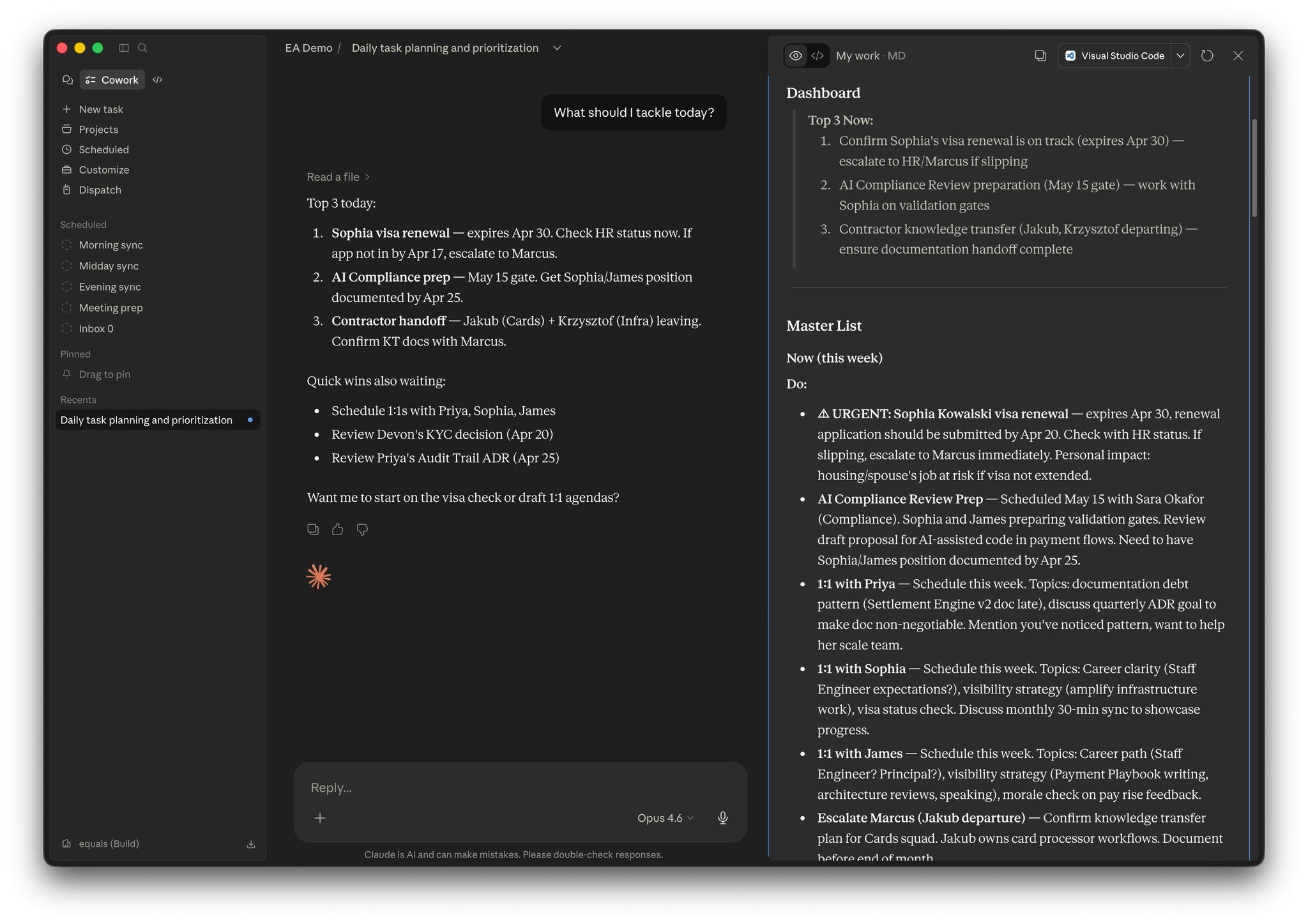
I start my morning by asking "what should I tackle today?" It checks my calendar, cross-references my priorities, scans what's been said in Slack overnight, picks up any new incident channels that spun up while I was offline, looks at what's overdue, factors in upcoming deadlines, and gives me a focused plan. Not a generic productivity suggestion. A plan that knows I have a demo at 2pm, a 1:1 at 3pm, compliance training due in 5 days, stale PR reviews I've been putting off, and that an incident kicked off in #inc-payments-latency at 3am that the on-call team has already triaged but I'll want to be across before standup.
Then I say "inbox." It reads every unread email, triages the lot, and presents them categorised: which ones to delete (most cold outreach, calendar acceptances, system noise), which to archive after digesting key content, which need action with suggested next steps, and which need my decision. It uses judgment, not a blanket rule. A cold outreach from a vendor in a space we're actively evaluating, or from a recruiter for a role we're trying to fill, gets surfaced rather than deleted. It knows who my direct reports are. It knows which emails relate to active projects. It reads meeting recap emails and extracts action items, decisions, and commitments before archiving them. The inbox goes to zero, and every piece of useful information is captured in the right place.
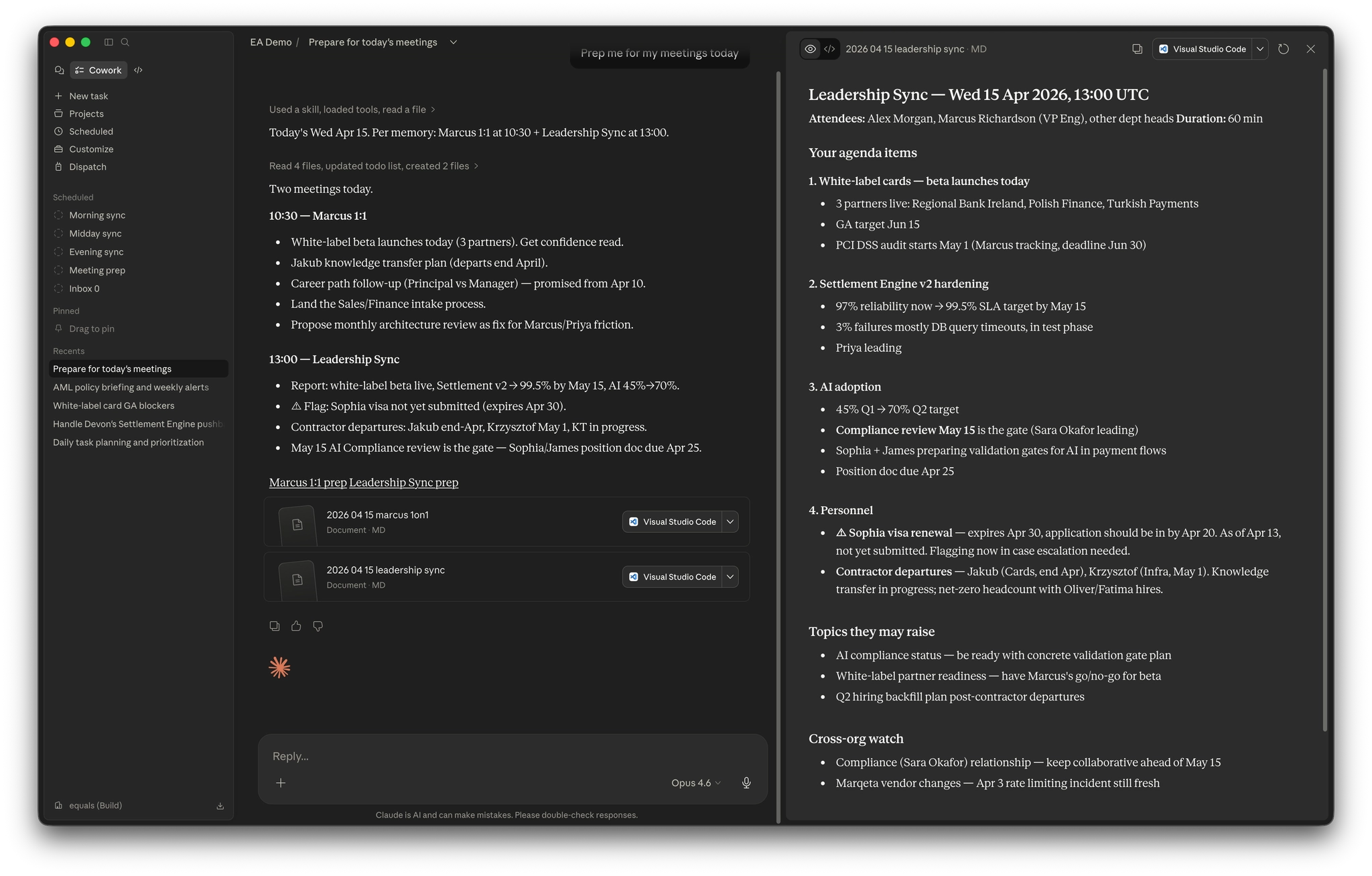
Before my 1:1, I ask it to prep me. It pulls context from the person's file. Their working style, their current focus, recent observations from Slack, active coaching points, and any sensitivities from the team dynamics file. It writes a prep doc I can scan in 2 minutes before walking into the meeting. Not boilerplate. Specific, actionable, informed by months of accumulated context.
Someone shares a technical design document on Notion. I say "review this." It reads the doc, cross-references it against what it knows about our architecture, our team capacity, our processes, and the team dynamics at play, then comes back with a structured set of draft comments for me to look over. Each one cites the section it applies to and explains why it matters given context the author may not have. I read through them, edit, drop the ones that don't land, sharpen the ones that do, and then post. The system doesn't speak for me. It surfaces what's worth my attention so I can weigh in well, faster than I could on my own. That distinction runs through everything here: I'm the decision maker, and the assistant's job is to make sure the right context is on the table when I decide.
Most of the time I don't have to tell the system anything at all. The sync pulls from Slack, Notion, GitHub, my calendar, and my email on a schedule, so if I've already said something to the person or the team in Slack, it's picked up automatically and reconciled against what was there before. The casual conversational update is there for the edges: a decision made over coffee, a shift mentioned in a meeting that didn't produce a transcript. When I do say "he's not moving to that team permanently, he's supporting both," every relevant file updates at once. The person's profile, the project notes, my task list. No correction gets lost. No stale information lingers.
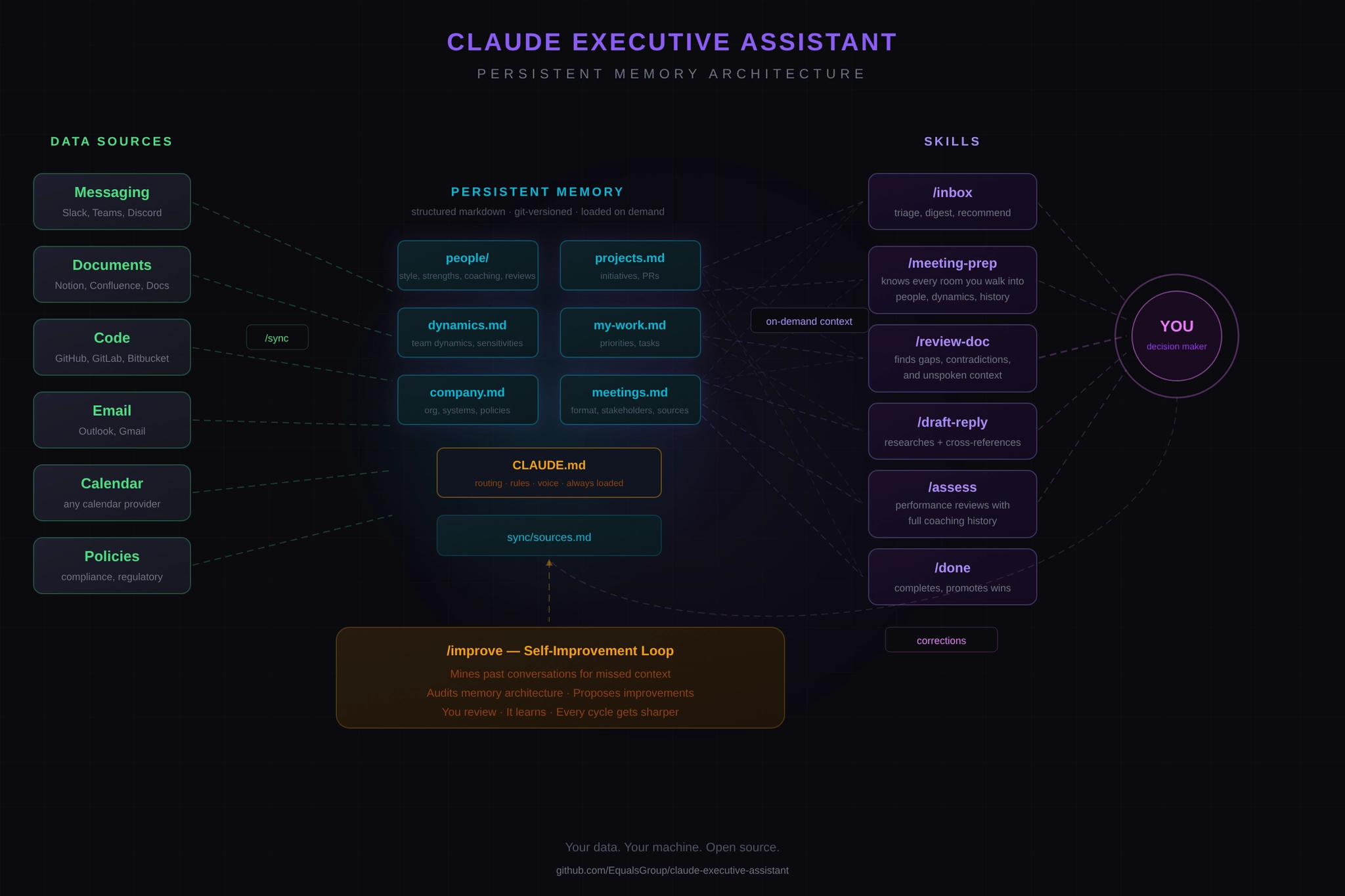
The architecture is simple and deliberate. The plugin provides the intelligence. Skills for inbox triage, meeting prep, document review, performance assessments, daily planning, reply drafting, and more. Your data lives in a folder on your machine. Structured markdown files that represent your current reality: your priorities, your people, your projects, your company, and the sensitive dynamics you navigate.
Claude reads the relevant files on demand. Not everything, every time, but the right files for the right conversation. When you talk about a person, it loads their file. When you prep for a meeting, it loads dynamics too, because every interaction has relational context. When new information surfaces, it flows to every file that needs updating.
The memory is version-controlled with git. Every update is a clean snapshot of current truth. You can look back at how your understanding of a situation evolved. You can see exactly what changed and when.
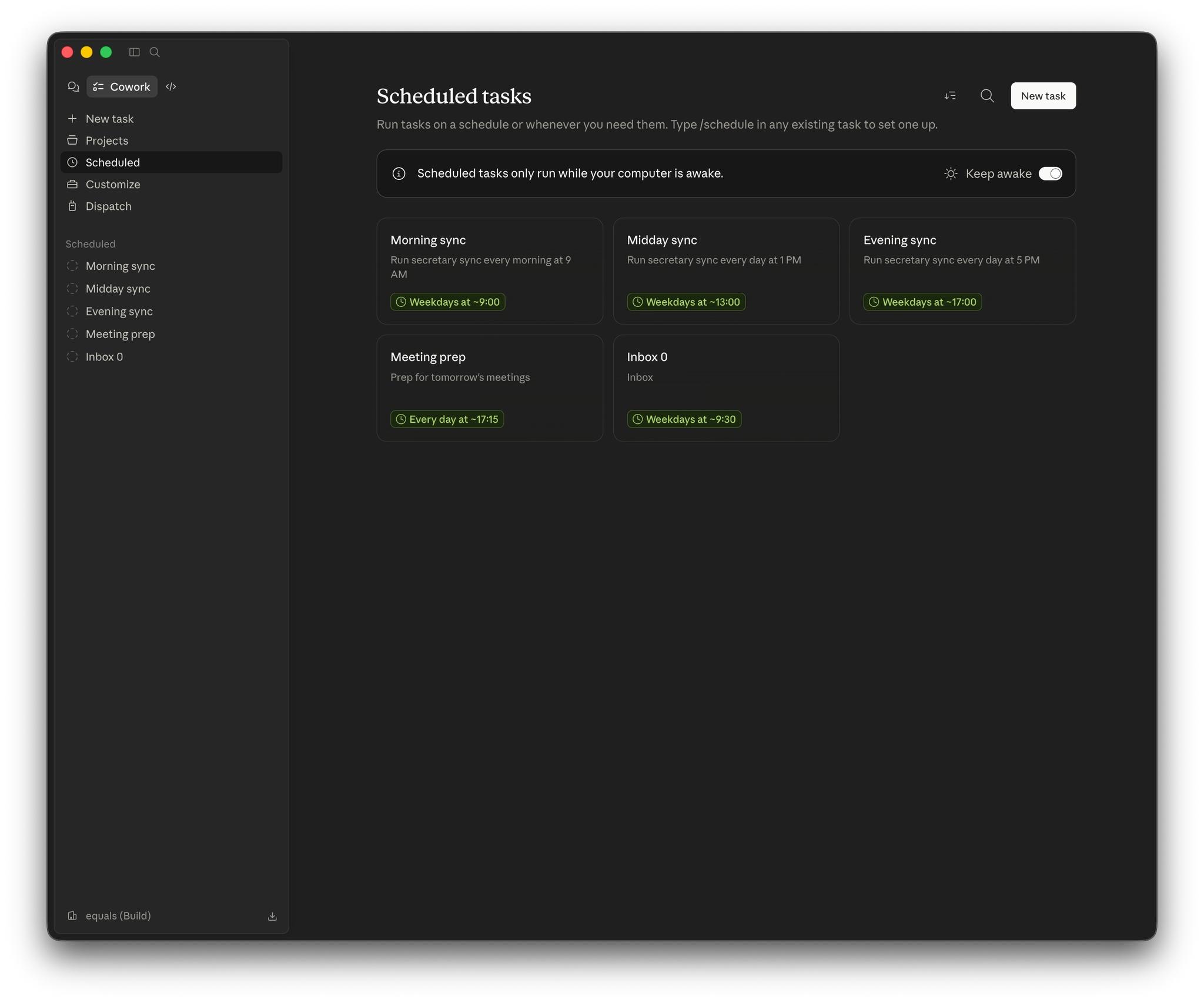
It syncs from your existing tools (Slack, Notion, GitHub, your calendar, your email) automatically. I have it scheduled three times a day: morning, midday, and end of day. By the time I sit down, it's already pulled in everything that happened while I wasn't looking and reconciled it against what it already knows. You can also trigger a sync manually if you know a lot has changed, but the schedule handles almost everything.
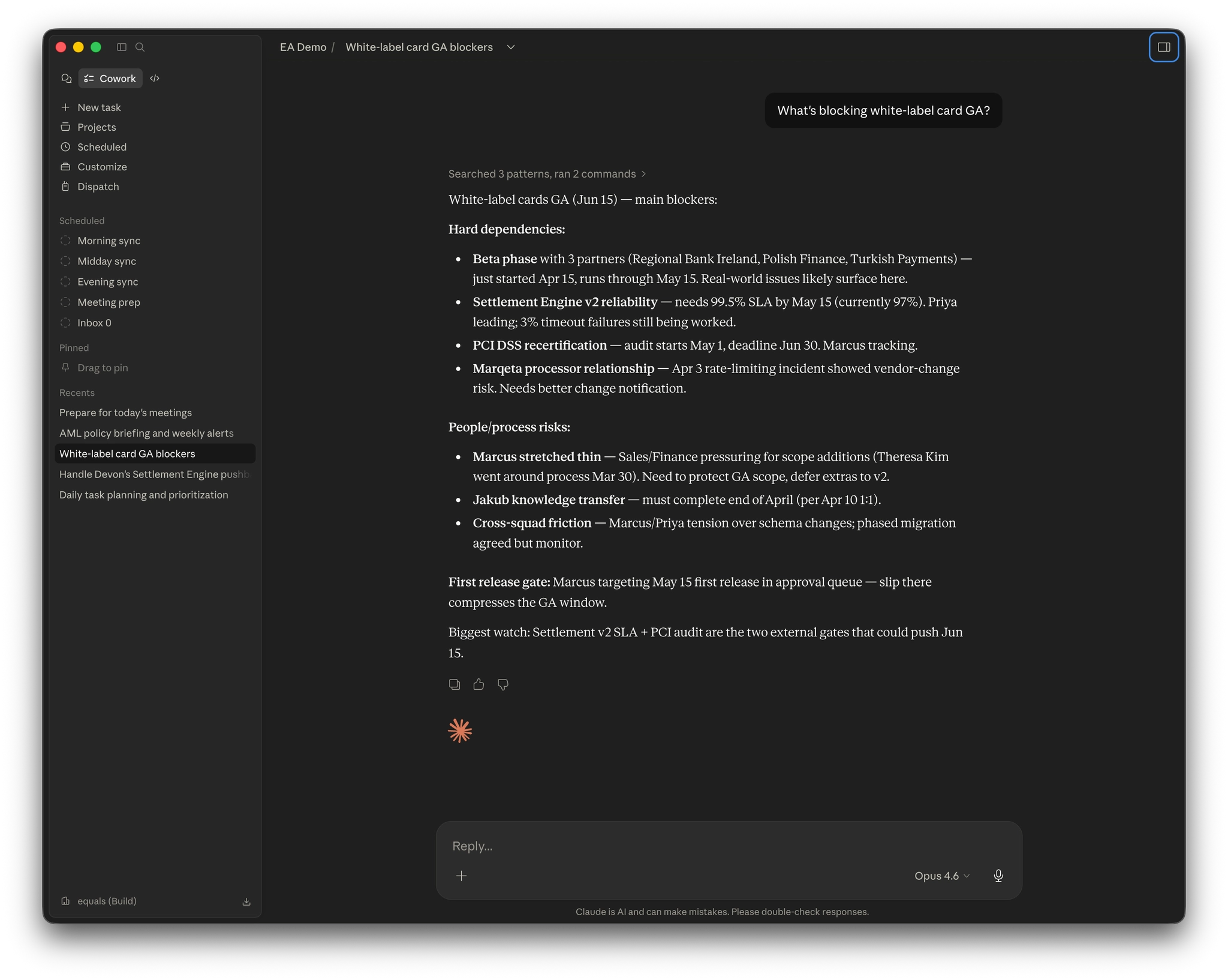
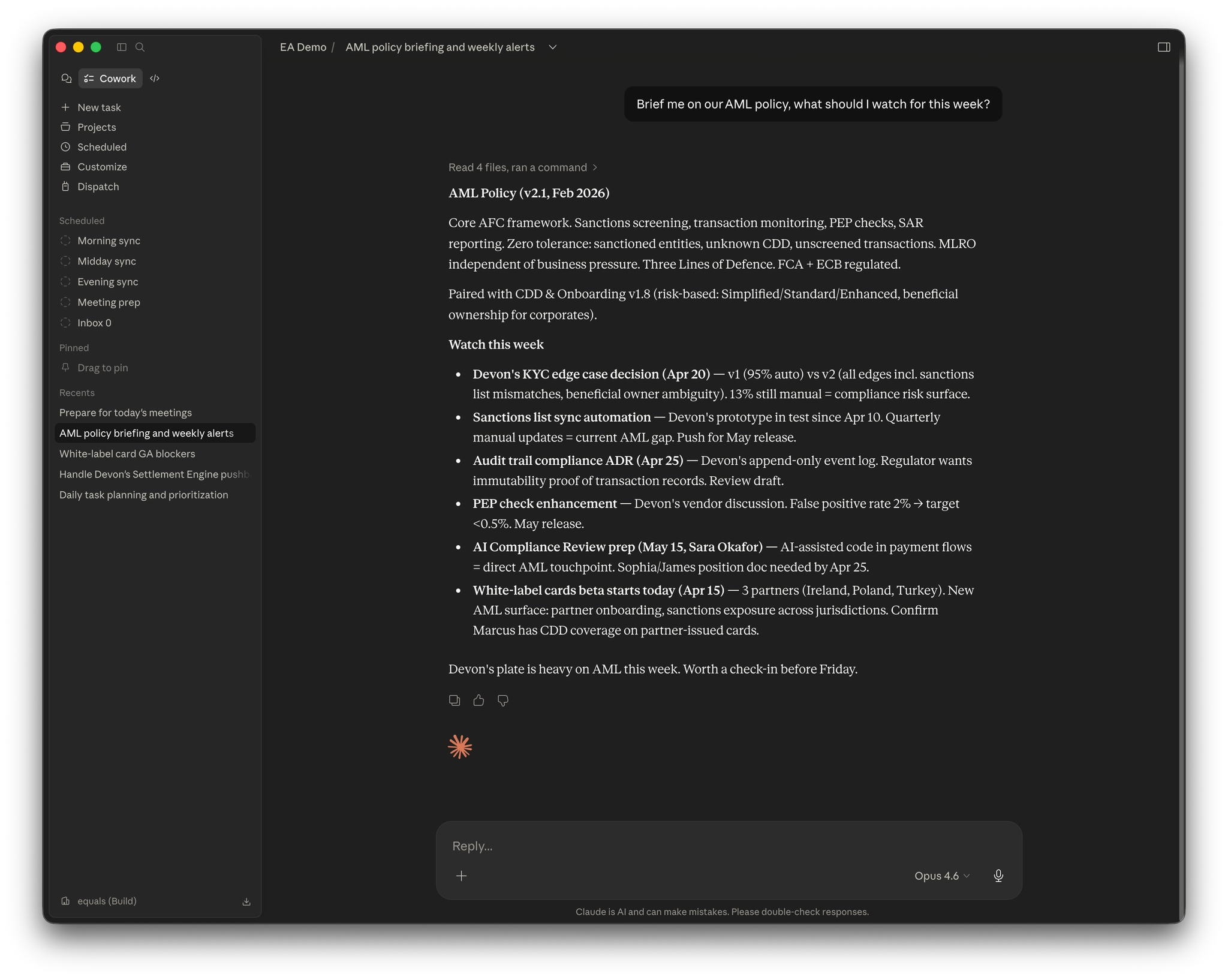
It also extends beyond personal context. We added full awareness of all 22 of our company policies. AML, consumer duty, safeguarding, data protection, fraud, sanctions screening, all of it. Now, whenever a conversation touches compliance or regulatory topics, the relevant policy digests load automatically. And it doesn't just check its own outputs against policy. It proactively flags anything across your day that looks off: a request that conflicts with policy, a transaction pattern that warrants AML or CTF escalation, a process step that should involve Compliance or the DPO. The compliance lens is always on. Every employee gets instant, accurate access to institutional knowledge that used to live in a PDF nobody read. That's not personal productivity. That's organisational capability.
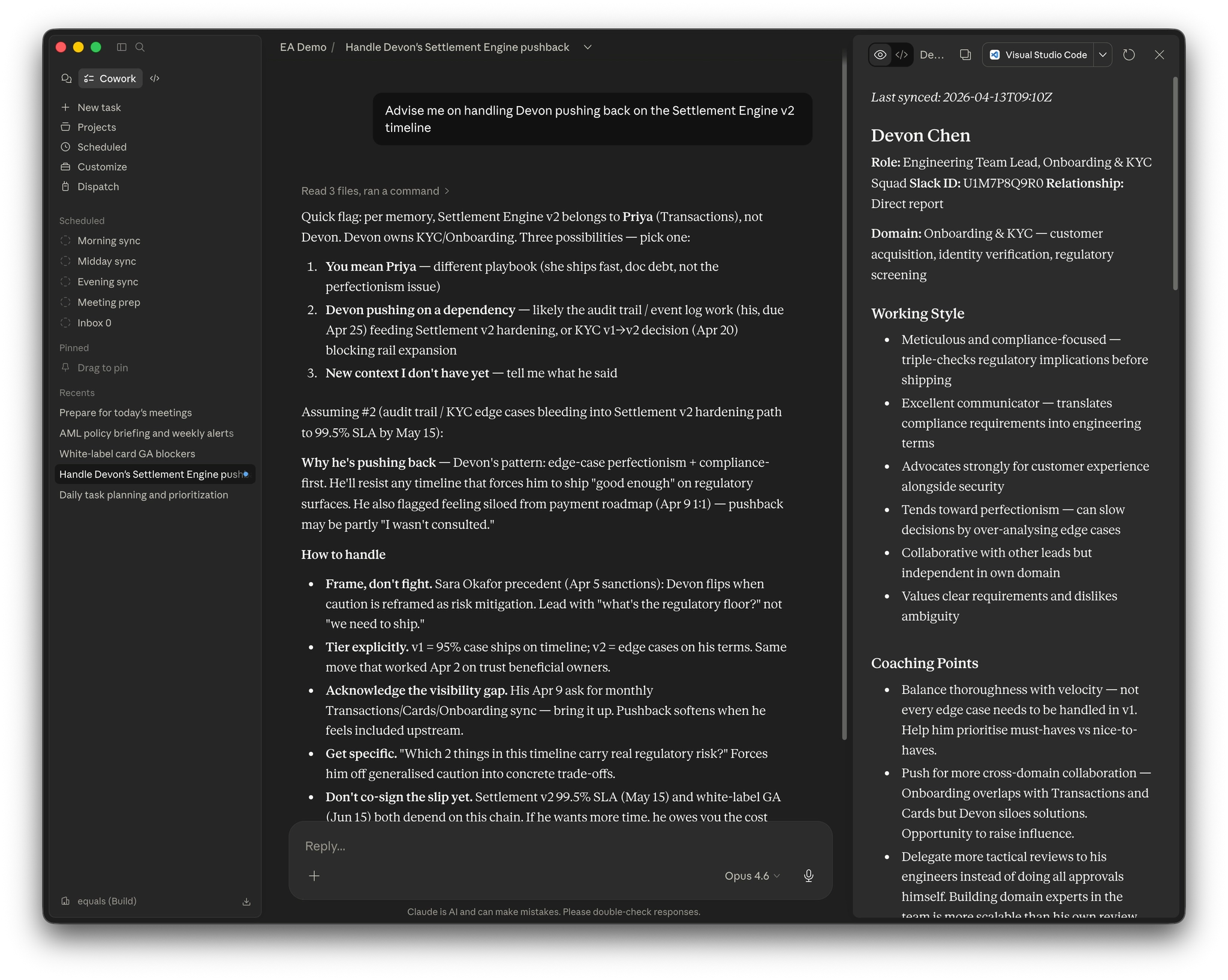
And because everything is structured markdown in a folder you own, you can read it, edit it, move it, back it up, or delete it whenever you want. No vendor lock-in. No cloud database you can't inspect. Your data stays local, governed by the same access controls as the source systems. Your context is yours.
The last piece worth calling out is how the system evolves. It has an /improve skill that treats your past conversations with it as training data. Where it fell short, what you corrected, what context it should have had but didn't. It audits its own memory architecture, proposes changes, and you approve or reject them. Nothing ships without your review. Every cycle it gets sharper, and that compounding is doing a lot of the work. Most of what the system is today was not written by hand. It was written by the system improving itself, under supervision, over two months of real use.
We're at a turning point in how knowledge work gets done. AI can now do things that, just two years ago, were firmly in the "requires a human" category: reading a full inbox and understanding which emails matter based on organisational context, preparing for a meeting by synthesising information from six different sources, reviewing a technical document with genuine subject-matter awareness.
But there's a catch. AI without context can write a great email, but not your email, to that person, about that project, given that specific situation. The gap between "AI that can help" and "AI that actually helps you" is entirely a context gap.
That's what this system closes. It gives AI the same thing that makes a great executive assistant great: deep, accumulated, personal context about you and your world. And crucially, it keeps you in the driver's seat. This isn't about handing everything off to AI and hoping for the best. It's about having a capable partner that does the legwork, but takes your direction the moment you offer it. You're always the expert. You're always the decision-maker. The system just makes sure you're not wasting your expertise on things that don't need it.
The implications go well beyond engineering management. Think about what this means for a sales lead managing relationships across dozens of accounts. Context about deal history, stakeholder dynamics, and what was promised in last quarter's QBR, loaded automatically before every call. Or a product manager juggling roadmap commitments, stakeholder expectations, and technical dependencies across multiple teams. Or a founder context-switching between investor relations, product decisions, hiring, and customer escalations a dozen times a day.
Anyone whose job involves managing complex information flows across people, projects, and priorities, which honestly is most knowledge workers, can benefit from a persistent, context-aware assistant that handles the operational overhead so they can focus on the decisions that actually require their expertise.
The boring parts of your job (the triage, the prep, the status tracking, the context-switching) aren't boring because they're unimportant. They're boring because they're repetitive, mechanical, and don't benefit from your unique judgment. They're the tax you pay for being in the loop. This system pays that tax for you.
The entire system (the plugin, all skills, the scaffold, the architecture) is open source under the AGPL-3.0 license. You install it, run the setup wizard, and start building your context. It works with Claude's Cowork mode and Claude Code.
Because it's a plugin, the assistant itself is portable. No local install, no terminal, no developer setup. Install it once and it's available wherever you use Claude. Memory portability depends on where you keep your memory folder: a local-only folder stays on one machine, while a folder in cloud-synced storage (Dropbox, iCloud, OneDrive, Google Drive) travels with you and can be mounted into Cowork from any laptop. That matters for two reasons. First, it puts this capability in reach of non-technical users, not just engineers. Second, because Claude supports organisation-level plugins, you can roll this out across an entire company in a single step. Everyone on the same scaffold, the same skills, the same policy lens, without IT provisioning each laptop. Similar systems like Claude Second Brain tie the assistant to a single machine. This one doesn't.
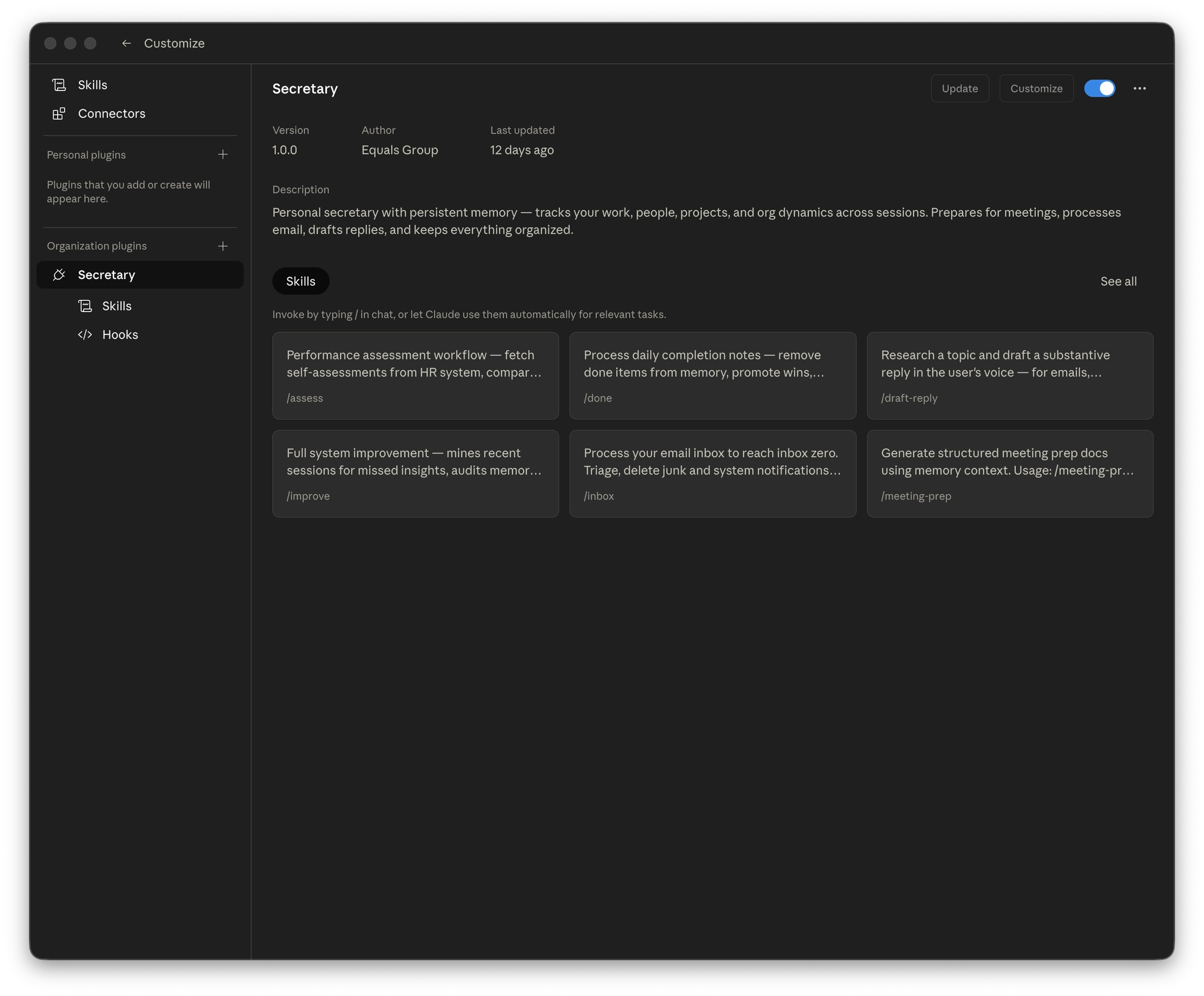
The plugin is connector-agnostic. It works with whatever tools your organisation uses. Slack or Teams, Notion or Confluence, GitHub or GitLab, Outlook or Gmail. You configure your sources, and the sync engine pulls from them.
We built this at Equals Money for our own team. We're releasing it because we believe this capability shouldn't be locked behind an enterprise paywall or a job title. If AI is going to change how we work, the benefits should be distributed, not concentrated.
I'd be doing you a disservice if I didn't talk about what's still hard.
This system has deep access to your work life. Your email, your messages, your org dynamics, your people files. That's what makes it useful, but it's also what makes governance essential. Most companies don't yet have clear AI governance frameworks. There's no widely adopted equivalent of the three lines of defence model for agentic AI. The policies that bind these agents are currently defined by whoever builds the skills, and there aren't enough checks and balances.
We've taken this seriously at Equals. The system carries digests of all 22 of our company policies in its memory. Its always-on rules enforce regulatory obligations every session: data protection, AML, consumer duty, whistleblowing confidentiality. But I'll be honest. We're a regulated financial services company with an existing compliance infrastructure to lean on. If you're deploying this in a context with strict labour laws around automated decision-making, employee monitoring, or data processing consent, you'll need to think carefully about what that means for your jurisdiction and your people.
Some questions worth asking before you roll this out. Who defines the policies that bind the agent? Who reviews changes to those policies? How do you audit what the agent decided and why? What consent do you need from the people whose information flows through the system? These aren't problems the plugin solves for you. They're problems your organisation needs to solve around it.
The technology is ready. The governance is catching up. Be thoughtful about the gap.
Install the plugin, run /setup, and spend a few minutes filling in the basics. Your name, your role, your team, your key tools. Then just start using Claude the way you normally would. Talk about your work. Share updates. Ask for help. The system learns as you go.
Within a week, you'll have an assistant that knows your world better than any tool you've ever used. Within a month, you'll wonder how you ever managed without one.
Sign up to our daily market reports to get the latest news and insights on worldwide currency movements straight to your inbox every morning.
Enter your email address below to subscribe.