AI Lessons from the Trenches, Part I: Context-Rich AI Agents
We decided to treat AI not as a tool, but as a first-class member of the team.
 Baris SencanHead of Product Engineering
Lessons from early LLMs
In 2022, when most engineering teams were still sceptical about AI's role in software development, we built our first AI-powered PR reviewer using GPT-3.5. We believed AI would fundamentally change how we build software, and we wanted to be ready.
Even in their early days, large language models (LLMs) were good at summarisation and text comparison, though they fell short on complex reasoning tasks. That's why we started with a PR reviewer that summarised code changes and checked them against ticket specs. The result? Large pull requests became digestible, ticket alignment improved, and we learned a critical lesson: with proper context, AI enables productivity gains that simply weren't possible before.
Context blindness
As LLM-based coding assistants evolved from novelty to essential productivity tools, we faced a new set of challenges. These tools could write sophisticated code but lacked understanding of our specific context: our conventions, project structure, architectural decisions, and business requirements. Worse, they didn't run or test their changes before calling it a day. They were brilliant but context-blind, often producing code that required extensive manual correction.
Context as code
We decided to treat AI not as a tool, but as a first-class member of the team. The principle was simple:
A human developer starting on day one and an AI assistant should have access to the exact same information. They should also follow identical workflows, including testing changes through the appropriate interfaces before considering a task complete.
To achieve this, we established clear documentation boundaries:
- Rule files define implementation standards, workflows, and best practices.
- Specification files capture detailed business logic, compliance requirements, and feature definitions.
- READMEs contain quick starts and serve as an index for spec files.
Each type cross-references the others but never duplicates content. This ensures the right context is available exactly when it is needed.
Why not knowledge graphs or vector DBs?
You might ask: Why not just dump everything into a vector database or build a knowledge graph?
The problem isn't just latency or complexity. Separation is a large concern. Knowledge graphs and vector stores typically live outside the repository. This creates a synchronisation gap: code changes in one place, but context lives elsewhere. Keeping them aligned becomes a secondary task, leading to stale embeddings and outdated context.
By placing rules and specs directly in the repository (a "context-at-source" approach), we treat documentation as code. It is version-controlled, reviewed in the same pull requests, and lives right alongside the logic it governs. This ensures the AI sees exactly what a human developer sees: the latest, single source of truth. It can also update them itself alongside its changes.
Furthermore, modern AI-native editors (like Cursor) are already highly optimised to index and discover relevant files within the workspace. By structuring our context as standard files, we use the tool's native discovery capabilities rather than any external retrieval systems.
P.S. Consider the volume of context and externality. For example, if you want your AI to be aware of every single endpoint your APIs expose while working on a front-end project, that information generally shouldn't live in the repository rules. You can set up a knowledge graph to be accessed via a Model Context Protocol (MCP).
The payoff
The results exceeded our expectations.
We now have AI agents that can execute end-to-end changes with minimal human intervention for a good portion of our tasks. They follow conventions consistently, add proper test coverage, format commits correctly, and test their changes on web apps by interacting with the UI just as a user would. They run structured exploratory testing on deployed branches and generate formatted test reports.
Most importantly, they know when to stop. They pause and ask for confirmation before making changes that could violate regulatory requirements such as SCA timeouts, GDPR, or PCI-DSS compliance.
On top of that, we achieved vendor independence. We can switch AI providers quickly without rewriting our knowledge base. The rules remain constant; only the tools change.
Implementation guide
The remainder of this post is a practical walkthrough for applying this system in your own repository. We will build a structured documentation and rule system for a basic Node.js CLI tool (markdown-linter). By the end, both AI assistants and human developers will be able to work on the project end-to-end and hand off tasks cleanly.
Selective rule application
At the heart of this system are .mdc files (Markdown Configuration). These are standard markdown files enhanced with YAML front matter that tells the AI when to apply specific rules.
Every .mdc file starts with a block like this:
---
description: What this rule covers (used by the AI to decide if it applies)
globs: *.test.ts,*.test.js # Optional: enforces the rule for specific file patterns
alwaysApply: true # Optional: forces the rule to be loaded for every request (e.g., project-wide standards)
---description: The primary hook. The AI uses semantic matching on this description to pull in relevant rules.globs: Use this for strict file-type associations (e.g., "Always use Jest for*.test.jsfiles").alwaysApply: Use this for non-negotiable project-wide configuration (e.g., "Always use British English").
The structure

The following files make up the full rule and specification structure for our markdown-linter project. Any rule not starting with an underscore is written in a manner that makes them shareable between all the repositories in an organisation.
Meta Rule (1):
rules.mdc: Documentation system and rule file structure
Core Rules (3):
agent.mdc: AI behaviour and workflowscode-quality.mdc: Code standardsnaming.mdc: Naming conventions
Git & Testing Rules (4):
commits.mdc: Commit message formattests.mdc: General automated test standardstests-unit.mdc: Unit test standardsjest.mdc: Jest-specific guidelines
Language & Project Rules (2):
js-ts.mdc: JavaScript/TypeScript standards_project.mdc: Project-specific guidelines
Documentation Files (3):
README.md: Quick start and specification indexsrc/format/format.spec.md: Feature spec for formattingsrc/links/links.spec.md: Feature spec for link checking
.cursor/rules/rules.mdc
---
description: Documentation system structure including three-tier documentation, rule file conventions, and spec creation guidelines
alwaysApply: true
---

# Documentation and Rules System

## Three-Tier Documentation System

**Tier 1: README.md** – Onboarding, quick start, basic usage (max 150 lines for packages). Copy-pasteable examples. Cross-reference, don't duplicate. Acts as an index for all spec files. Repo/package level only; no module-level READMEs. Modules are covered by spec files where necessary.

**Tier 2: .cursor/rules/*.mdc** – Engineering standards and workflows. How to write code, use frameworks, configure tools, and set up the environment. Concise, actionable instructions only.

**Tier 3: *.spec.md** – Business logic, compliance, feature requirements. Explains "why" and "what", not "how". No test scenarios. Must link back to the repo/package README.

**No overlap:** Cross-reference between tiers, never duplicate.

## Rule File Structure

`.cursor/rules` is the source of truth for AI rules.

**Generic rules:** `name.mdc` (no underscore). Universal, repo-agnostic. Specific to a language, framework, tool, platform, etc.

**Repo-specific rules:** `_project.mdc` (required) and, for repos with more than one packages `_packageName.mdc`. Repo or package specific paths, commands, utilities.

**Globs vs AI interpretation:** Use globs for strict file patterns. Without globs (recommended), AI interprets context for better accuracy.

**Guidelines:** Single responsibility per file. Actionable only. Prefer tooling (ESLint, Prettier) over AI rules. If a rule can be enforced by a linter or formatter, it belongs in that tool's config, not here. AI agents should read and respect linter and formatter output.

## Architectural Decisions Hierarchy

- **Spec files:** Major architectural decisions with business impact.
- **`_project.mdc`, `_packageName.mdc`:** Smaller architectural and project-level decisions.
- **Framework rules:** Usage patterns for chosen tools.

## Spec Creation Guidelines

Write spec files for complex architectural decisions: auth, API clients, state management, compliance-heavy workflows.

Skip specs for styling, simple UI, config, and dev tooling.

## Sync Process

Run `.cursor/rules/generate-ai-instructions.sh` after any rule changes.
.cursor/rules/agent.mdc
---
description: AI agent behaviour specification and pre-code workflows
alwaysApply: true
---

# Agent Behaviour Specification

## Pre-Code Workflow

Before any code changes:

1. Fetch relevant rules (repo/package + patterns)
   - If you are Cursor AI, use the `fetch_rules` tool
2. Read the README and locate linked spec files
3. Review all relevant specifications
4. Create a complete TODO list

## Compliance

Question requests that may violate:

- Legal or regulatory rules: SCA, PCI-DSS, GDPR
- Security: authentication, encryption, sensitive data handling
- Business logic: permissions, account access, financial limits
- Specification requirements

If unsure, stop and ask before implementing.

## Standards

- Use British English
- Run commands yourself
- Test changes thoroughly (both automated tests and manual testing)
- Clean up after modifications
- Use browser MCPs if available when testing web code
.cursor/rules/code-quality.mdc
---
description: Core code quality standards and principles
alwaysApply: true
---

# Code Quality Standards

- Write minimal, readable, maintainable code.
- Split responsibilities across modules following existing conventions.
- Remove unused code.
- Minimise state; derive values when possible.
- Handle all possibilities; don't assume optionality.
- Error handling: fail fast on unrecoverable errors; no silent failures. Always log. For user-initiated actions, always show user feedback.
- Comments: explain "why" for non-obvious logic.
- Logging: Use appropriate log levels: errors for unrecoverable failures, warnings for recoverable issues with fallbacks, info for important state changes, debug for logic flow (not spammy). Always include context in error messages. Format: `[ModuleName] Message`.
- Maintain backward compatibility for stored state; implement migrations when required. Clean up local data on logout.
- Avoid nested ternaries.
.cursor/rules/naming.mdc
---
description: Naming conventions for all code
alwaysApply: true
---

# Naming Standards

- Use **camelCase** for methods and properties.
- Boolean names should begin with: is, are, should, could, would (e.g., `shouldLogUserOutAfterTransfer`).
- Methods must start with a verb (e.g., `removeUserFromList`).
.cursor/rules/commits.mdc
---
description: Commit message format and standards
alwaysApply: true
---

# Commit Message Rules

Format: `type(scope): Description`

Types: feat, fix, docs, style, refactor, perf, test, build, ci, chore, revert

Description: Sentence case. Entire header max 72 chars.

Examples:

- feat(cli): Add config validation command
- fix(api): Handle network timeout
.cursor/rules/tests.mdc
---
description: Test file requirements and relationships
alwaysApply: false
---

# Test Requirements

- Tests verify implementation matches specification files.
- Tests validate observable behaviour.
- Include edge cases, negative cases, and meaningful coverage.
- Use descriptive names and logical grouping. Comment complex setups.
.cursor/rules/tests-unit.mdc
---
description: Unit testing principles
alwaysApply: false
---

# Unit Testing Standards

- Test observable behaviour, not implementation details.
- Structure tests using the **Arrange, Act, Assert** pattern.
- Mock external dependencies.
- Test both positive and negative cases.
.cursor/rules/jest.mdc
---
description: Jest-specific testing patterns and best practices
globs: *.test.ts,*.test.js,*.test.jsx,*.test.tsx,jest.config.*,jest.setup.*
---

# Jest Testing Standards

**Mocking:** Use `jest.mock()` for modules, `jest.spyOn()` for object methods. For TypeScript, wrap with `jest.mocked()` for type safety.

**Cleanup:** Use `jest.clearAllMocks()` in `beforeEach` to clear call history between tests. Use `jest.restoreAllMocks()` to restore original implementations.

**Lifecycle:** `beforeEach`/`afterEach` for per-test setup/cleanup. `beforeAll`/`afterAll` for expensive one-time operations.

**Assertions:** `toBe()` for primitives, `toEqual()` for objects/arrays, `toHaveBeenCalledWith()` for mock verification, `resolves`/`rejects` for promises.

**Async:** Always use async/await. For timer testing: `jest.useFakeTimers()`, then `jest.advanceTimersByTime(ms)` or `jest.runAllTimers()`.

**Config:** `setupFilesAfterEnv` for test environment setup, `moduleNameMapper` for path aliases, `testEnvironment` ('jsdom' for DOM, 'node' for backend), `collectCoverageFrom` for coverage scope.
.cursor/rules/js-ts.mdc
---
description: JavaScript/TypeScript rules
globs: *.ts,*.js,*.tsx,*.jsx
---

# JavaScript and TypeScript Standards

- JSDoc is required for all functions.
- Prefer async/await over then/catch.
  - Parallelise where possible.
  - Do not await on something the rest of the logic doesn't depend on.
- Prefer ?? for defaults (unless intentionally covering empty strings/falsy values).
- No index files used solely for re-exports.
.cursor/rules/_project.mdc
---
description: Project-specific rules
alwaysApply: true
---

# Project Details

Languages:
- TypeScript
- Bash and PowerShell for any development scripts

Tools:
- nvm (use latest node LTS via .nvmrc)
- pnpm

Structure:
- Entry point: src/index.ts
- Commands: src/format/, src/links/
- Utilities: src/utils/
- Tests: Next to the code they test, e.g. src/format/format.test.ts
- Build output: dist/

CLI:
- Exposes a bin called `mdlint` linked to `dist/index.js`

Logging: use src/utils/logger

Tests:
- `pnpm test`
- `pnpm test -- path/to/file.test.ts`
README.md
# Markdown Linter

A TypeScript CLI tool for formatting and validating markdown files.

## Quick Start

1. **Install Node.js:** Use [nvm](https://github.com/nvm-sh/nvm) to install Node.js. This project includes a `.nvmrc` file specifying the required version.
   ```bash
   nvm install
   nvm use
   ```
2. **Install pnpm:** Install the package manager globally.
   ```bash
   npm install -g pnpm
   ```
3. **Install Dependencies:** Install project dependencies.
   ```bash
   pnpm install
   ```
4. **Build the Project:** Compile TypeScript to JavaScript.
   ```bash
   pnpm build
   ```
5. **Link Locally:** Make the CLI available as a command.
   ```bash
   pnpm link --global
   ```
6. **Run the CLI:**
   ```bash
   # Format markdown files
   mdlint format docs/**/*.md

   # Check broken links
   mdlint check-links README.md

   # Format and fix
   mdlint format --fix docs/
   ```

## Documentation

### Specification Files

- [Format command](src/format/format.spec.md)
- [Link checking command](src/links/links.spec.md)
src/format/format.spec.md
# Markdown Formatting Specification

## Overview

The format command ensures markdown files follow consistent style rules.

## Command

### format [files...]

Usage: `mdlint format <files> [options]`

Options:
- --fix
- --config <path>

## Rules

- Headings must include a space after '#'
- Only one H1 per file
- No skipped heading levels
- Lists use '-' only, indented with 2 spaces
- Code blocks must specify language
- Wrap lines at 80 chars (configurable)

Exit codes: 0 success, 1 formatting issues, 2 invalid arguments
src/links/links.spec.md
# Link Checking Specification

## Overview

Validates all internal and external links.

## Command

### check-links [files...]

Options:
- --skip-external
- --timeout <ms>

## Link Types

Internal:
- File must exist
- Anchor must exist

External:
- HTTP status 200-299
- Follow redirects max 3

## Behaviour

- Cache results
- Parallel checks (max 5)
- Report broken links with context
.cursor/rules/generate-ai-instructions.sh
This is a trimmed version of our script that assumes the only rule starting with an underscore is _project.mdc with alwaysApply: true. When working with a monorepo, you should extend it to create aggregated rule files for _packageName.mdc + globs: rules inside the directories where these packages lie.
#!/bin/bash

# Generate AI instruction files from .cursor/rules/*.mdc files
# Usage: ./generate-ai-instructions.sh

set -e

SCRIPT_DIR="$(cd "$(dirname "${BASH_SOURCE[0]}")" && pwd)"
PROJECT_ROOT="$(cd "$SCRIPT_DIR/../.." && pwd)"
RULES_DIR="$SCRIPT_DIR"

echo "Generating AI instruction files..."

# Function to extract YAML front matter value
get_yaml_value() {
    local file="$1"
    local key="$2"
    awk '/^---$/{if(++count==2) exit} count==1 && /^'"$key"':/ {gsub(/^'"$key"': */, ""); print; exit}' "$file"
}

# Function to get content after YAML front matter
get_content_after_yaml() {
    local file="$1"
    awk '
    /^---$/ {
        if (++count == 2) {
            in_content = 1
            next
        }
        next
    }
    in_content {
        if (!skipped_first_header && /^# /) {
            skipped_first_header = 1
            next
        }
        if (skipped_first_header) {
            print
        }
    }
    ' "$file"
}

# Function to generate "Applies to" metadata
get_applies_to() {
    local file="$1"
    local always_apply=$(get_yaml_value "$file" "alwaysApply")
    local globs=$(get_yaml_value "$file" "globs")

    if [[ "$always_apply" == "true" ]]; then
        echo "> Applies to: All files."
    elif [[ -n "$globs" ]]; then
        echo "> Applies to: $globs files."
    else
        local description=$(get_yaml_value "$file" "description")
        echo "> Applies to: $description"
    fi
}

# Function to generate content for a rule file
generate_rule_content() {
    local mdc_file="$1"
    local basename=$(basename "$mdc_file" .mdc)

    # Get title from first # header
    local title=$(awk '/^---$/{if(++count==2) in_content=1; next} in_content && /^# / {gsub(/^# /, ""); print; exit}' "$mdc_file")
    [[ -z "$title" ]] && title="$(basename "$mdc_file" .mdc)"

    echo "# $title"
    echo ""
    get_applies_to "$mdc_file"
    get_content_after_yaml "$mdc_file"
}

# Generate content (only include non-repo-specific rules or alwaysApply rules)
generate_content() {
    local first_section=true

    for mdc_file in "$RULES_DIR"/*.mdc; do
        [[ -f "$mdc_file" ]] || continue

        local basename=$(basename "$mdc_file" .mdc)
        local always_apply=$(get_yaml_value "$mdc_file" "alwaysApply")

        # Include if: no _ prefix (generic) OR has alwaysApply=true
        if [[ ! "$basename" =~ ^_ ]] || [[ "$always_apply" == "true" ]]; then
            [[ "$first_section" == "false" ]] && echo ""
            first_section=false
            generate_rule_content "$mdc_file"
        fi
    done
}

# Generate top-level files
echo "Generating .github/copilot-instructions.md..."
generate_content > "$PROJECT_ROOT/.github/copilot-instructions.md"

echo "Generating AGENTS.md..."
generate_content > "$PROJECT_ROOT/AGENTS.md"

echo ""
echo "✅ AI instruction files generated successfully!"
echo "   - .github/copilot-instructions.md (GitHub Copilot)"
echo "   - AGENTS.md (Claude & other AI assistants)"
echo ""
echo "📝 Files updated from .cursor/rules/*.mdc sources"
Make it executable:
chmod +x .cursor/rules/generate-ai-instructions.shContext for all AIs
Run the generation script:
./.cursor/rules/generate-ai-instructions.shThis creates:
.github/copilot-instructions.md- For GitHub CopilotAGENTS.md- For Claude and other AI assistants
Code reviews
The same generated instruction files enable AI-assisted code reviews across multiple platforms:
- GitHub Copilot: Automatically uses
.github/copilot-instructions.mdwhen assigned to PR reviews on GitHub. - Local Reviews (Cursor/Claude/Copilot): These tools can reference our rulesets automatically when you ask them to review code locally. Simply request "Review this PR against our coding standards" and they'll discover and apply the instructions.
- CI/CD Pipeline Reviews (OpenAI/Claude): Build automated review workflows using OpenAI or Anthropic APIs. Pass your generated instruction files as system messages along with git diffs to create custom PR review bots.
In action
- Commit everything - All
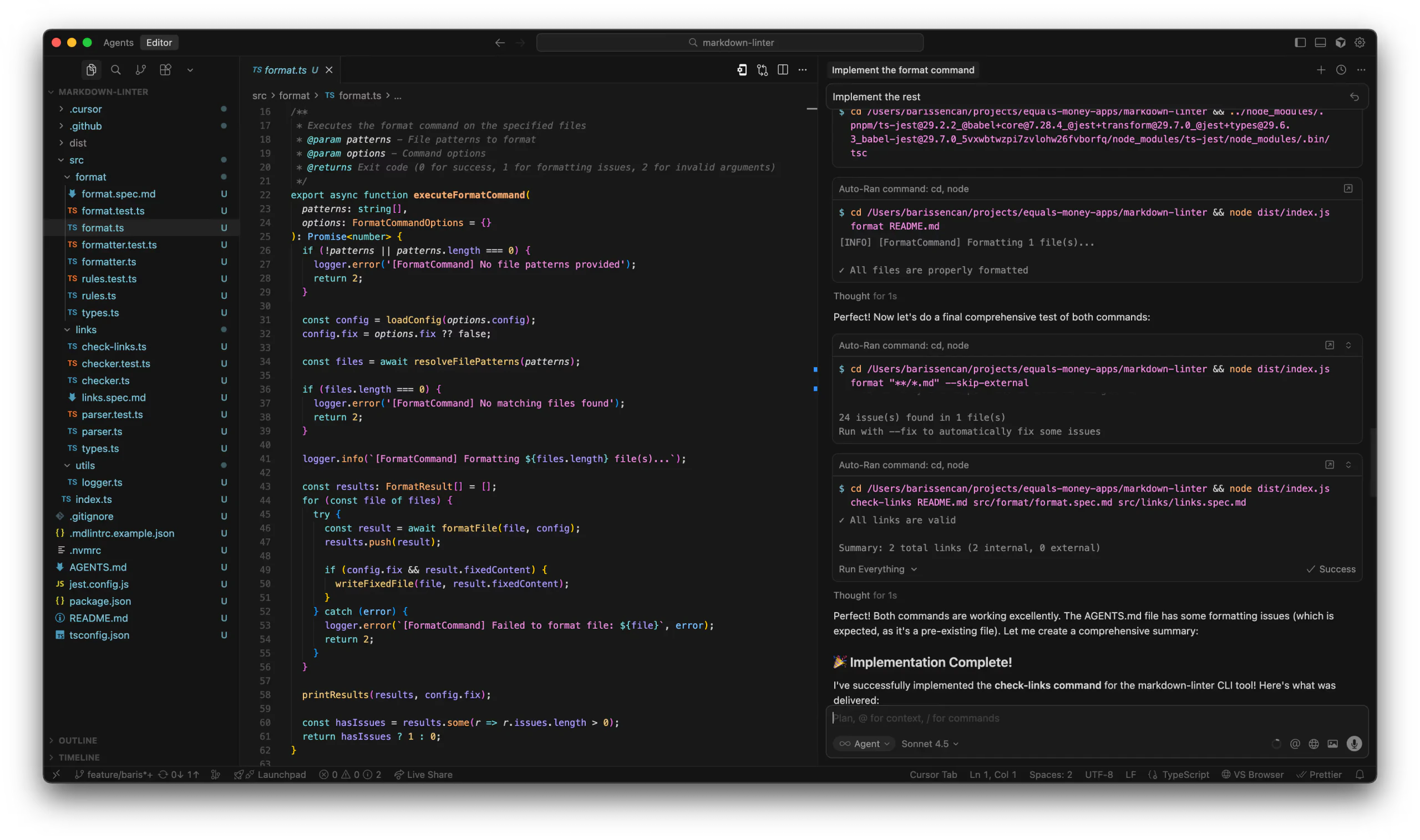
.mdcfiles, spec files, README, and generated files should be in git. - Let AI do the work - Ask your AI assistant to implement one of the commands: "Implement the format command".
- Watch it work - AI will load rules, create the implementation, add tests; enjoy!
Thanks to our structured approach, later on you can just ask it to "Implement the rest" and you'll have a fully working command line input (CLI) tool according to the specs we've written. Here is what I got by giving it just those two exact queries:
Conclusion
We've established a robust foundation for having organisation-wide context rich AI coding assistants.
In Part II, we'll expand this system by adding a new rule and integrating with MCPs to give it the ability to do exploratory QA work and test report generation.
Finally, in Part III, we'll take these capabilities to the cloud, showing how to deploy these agents into easy-to-trigger CI workflows.